Shared Web Hosting
Fast, Secure & Affordable Shared Hosting
Launch your website with reliable shared web hosting built for speed, security, and simplicity. Get cPanel, free SSL, fast SSD-powered performance, daily backups, and 24/7 expert support, all at a price that fits your budget.

Everything You Need to Host Your Website
From launching your first website to managing a growing business site, CloudCareHost gives you the essential tools and support you need in one shared hosting plan.
Fast Website Performance
Keep your pages responsive with performance-focused hosting designed to handle everyday website traffic smoothly.
Reliable Uptime
Keep your website available when visitors need it, with dependable server infrastructure built for consistent performance.
Easy to Manage
Manage your website, domains, files, databases, and email from a simple control panel without needing advanced technical skills.
Built-In Security
Protect your website with essential security features such as SSL and server-level protection, helping keep your website and visitor data safer.
Free Website Migration
Moving from another hosting provider? Our team can help transfer your website to CloudCareHost, making the switch easier and less stressful.
24/7 Expert Support
Get help whenever you need it. Our support team is available around the clock to help with hosting issues, website setup, and technical questions.
Choose the Shared Hosting Plan That Fits Your Website
Pick a plan based on your website's traffic, storage needs, and expected growth.
Shared Starter
Billed monthly
- 1 Website
- 3 Email Accounts
- 1 GB RAM
- 40 GB Storage & 100 GB Bandwidth
- 2 MySQL Databases
- 2,00,000 Inode Limit
- Terminal Access
- Daily Backups / Jetbackup
- 99.9% Uptime Guarantee
- 30-Day Money-Back Guarantee
Business
Billed monthly
- 100 Websites
- 20 Email Accounts
- 4 GB RAM
- 150 GB Storage & 1 TB Bandwidth
- 125 MySQL Databases
- 6,00,000 Inodes Limit
- Terminal Access
- Daily Backups / Jetbackup
- 99.9% Uptime Guarantee
- 30-Day Money-Back Guarantee
Shared Basic
Billed monthly
- 10 Websites
- 5 Email Accounts
- 2 GB RAM
- 100 GB Storage & 500 GB Bandwidth
- 15 MySQL Databases
- 4,00,000 Inode Limit
- Terminal Access
- Daily Backups / Jetbackup
- 99.9% Uptime Guarantee
- 30-Day Money-Back Guarantee
Business Cloud
Billed monthly
- 200 Websites
- 50 Email Accounts
- 6 GB RAM
- 200 GB Storage & 1 TB Bandwidth
- Unlimited MySQL Databases
- 7,00,000 Inodes Limit
- Terminal Access
- Daily Backups / Jetbackup
- 99.9% Uptime Guarantee
- 30-Day Money-Back Guarantee
What Is
Shared Hosting?
The concept is simple: Shared hosting is a type of web hosting where multiple websites use the resources of the same physical server. Instead of paying for an entire server, you share the server infrastructure with other websites.
This makes shared hosting a practical and affordable choice for personal websites, blogs, startups, and small businesses. With CloudCareHost, the technical side is handled for you, so you can focus on building your website.
How Does Shared Hosting Work?
Think of shared hosting like an apartment building. The building provides the main infrastructure, while each resident has their own private space and locked door.
1. The Server
A powerful physical server provides the computing power and network connection.
2. Shared Resources
Resources are distributed safely among multiple isolated hosting accounts.
3. Multiple Websites
Websites operate smoothly side-by-side without seeing each other's files.
4. Individual Control
You get your own control panel to manage just your website securely.
Why Is Shared Hosting Affordable?
By sharing infrastructure, we keep costs low while maintaining premium performance.
Infrastructure costs are shared
The cost of server hardware, networking, data center facilities, and other infrastructure is spread across multiple hosting accounts.
Server management is handled by us
CloudCareHost takes care of essential server maintenance, allowing you to manage your website without becoming an administrator.
No dedicated hardware is required
You get the hosting resources needed for your website without the massive expense of renting a complete physical server.
No advanced administration needed
You can manage common website tasks through our intuitive control panel instead of dealing with complex server commands.
Is Shared Hosting Right for You?
A good starting point when you need dependable website hosting without the cost or technical work of a VPS.
Personal Websites
Create a website for your portfolio, personal projects, or hobbies.
Blogs
Publish articles and content with hosting that is simple to manage.
Small Business
Professional online presence with hosting for company websites.
Freelancers
Host portfolio websites and client projects straightforwardly.
Startups
Get your new business online without committing to high costs.
WordPress
Run WordPress websites with tools needed for installation.

Powerful Features, Fast Resources
You shouldn't need to be a server expert to run a website. CloudCareHost shared hosting brings the essential hosting tools into one straightforward environment, giving you more control without the complexity.
Shared Hosting Built for Faster Websites
Website speed matters from the moment someone lands on your page. Slow loading can frustrate visitors, increase drop-offs, and make everyday website management feel harder than it should. CloudCareHost combines fast storage, server optimization, caching, and modern hosting technology to give your website a responsive environment.
Fast Server Infrastructure
Your website needs more than just storage space. It needs an infrastructure that can respond quickly when visitors request pages, images, files, or database content. CloudCareHost uses performance-focused server infrastructure to keep everyday website workloads running smoothly.
Optimized Caching
Caching allows frequently requested website content to be served faster instead of being generated from scratch every time. With the right caching setup, pages can load more quickly and your server can handle repeated requests more efficiently.
Content Delivery Support
Visitors may come from different cities or countries, so distance can affect how quickly website content reaches them. Content delivery support helps serve static website assets such as images, CSS, and JavaScript from locations closer to your visitors.
Latest Technology Stack
A fast website depends on more than one feature. CloudCareHost brings together modern technologies across the hosting environment, including:
- Modern PHP versions for better compatibility with current websites and applications
- Optimized databases to handle website queries efficiently
- Web server optimization for smoother request processing
- Fast SSD or NVMe storage for quicker file and data access
- Caching to reduce unnecessary processing and improve page response times
Protect Your Website with Built-In Hosting Security
A website can face unwanted traffic, malware, automated attacks, and other online threats at any time. CloudCareHost includes essential security layers natively.
Free SSL Certificate
Secure connections between your website and its visitors.
Malware & Threat Protection
Detect and reduce common security threats affecting files.
DDoS Protection
Filter malicious traffic and keep legitimate requests flowing.
Regular Backups
Keep copies of your website data to restore when needed.

Manage Your Website Without Technical Complexity
You shouldn't need to understand server administration just to manage a website. CloudCareHost gives you practical tools for handling everyday hosting tasks, from uploading files and creating email accounts to managing domains and databases.
Easy Hosting Dashboard
Access the tools you need from a centralized hosting interface. Manage your website and hosting settings without having to work directly with complicated server commands.
One-Click WordPress Installation
Starting a WordPress website doesn't have to involve a lengthy manual setup. Install WordPress quickly and move on to choosing your theme, adding content, and building your site.
File Management
Upload, download, move, rename, edit, and organize website files through the hosting file manager. It is useful when you need to make quick changes without opening a separate FTP application.
Database Management
Create and manage databases needed by WordPress, PHP applications, and other database-driven websites.
Email Management
Create professional email accounts using your domain and manage mailboxes from your hosting panel.
Domain Management
Manage the domains and website addresses connected to your hosting account from one place. Add domains, configure settings, and keep your web presence organized.
Launch Your Website in 4 Simple Steps
Getting a website online does not have to involve complicated server setup. With CloudCareHost shared hosting, you can go from choosing your plan to publishing your website in a few straightforward steps.
Step 1: Choose a Shared Hosting Plan
Start with a shared hosting plan that matches your website's needs. Consider your expected traffic, number of websites, storage requirements, email accounts, and the applications you plan to run.
Step 2: Connect or Register a Domain
Choose a domain name that represents your website or business. You can register a new domain or connect a domain you already own by pointing it to your CloudCareHost hosting account.
Step 3: Build Your Website
Now bring your website to life. Install WordPress, upload your existing website files, or use another supported application to create your pages, add content, and customize your site.
Step 4: Publish and Grow
Check your pages, forms, links, images, and mobile experience before going live. Once everything looks right, publish your website and keep improving it as your visitors and business grow.
Shared Hosting vs Other Types of Web Hosting
Not every website needs the same level of hosting resources. Shared hosting, WordPress hosting, VPS hosting, and dedicated servers are designed for different workloads, budgets, and levels of technical control.
| Hosting Type | Best For | Resources | Management |
|---|---|---|---|
| Shared Hosting | Personal sites, blogs, small businesses, portfolios | Shared server resources | Easy |
| WordPress Hosting | WordPress websites | Optimized for WordPress | Easy |
| VPS Hosting | Growing websites, applications, higher-traffic projects | Dedicated virtual resources | Moderate to advanced |
| Dedicated Server | Large websites and demanding applications | Entire physical server | Advanced |
Shared Hosting vs VPS Hosting
Shared hosting places multiple websites on the same server, while VPS hosting gives your website a dedicated portion of virtualized server resources.
Choose shared hosting when you want an affordable, easy-to-manage environment for a personal website, blog, portfolio, or small business site.
Shared Hosting vs Dedicated Server
With shared hosting, server resources are shared among multiple hosting accounts. A dedicated server gives you an entire physical server for your website or applications.
Shared hosting is usually the better starting point when keeping costs and technical management low matters.
Shared Hosting vs WordPress Hosting
Shared hosting is a general-purpose hosting environment that can support different website platforms and applications. WordPress hosting is specifically configured around WordPress websites.
Choose shared hosting for flexibility and affordability. Choose WordPress hosting for a WordPress-focused environment.
When Is It Time to Upgrade Your Shared Hosting?
Shared hosting is a practical choice for many websites, but your hosting needs can change as your website grows. More visitors, heavier applications, larger databases, and greater control can eventually make VPS or dedicated hosting a better fit.
-
Website Traffic Continues to Grow
-
Resource Requirements Increase
-
Applications Need More Processing Power
-
You Need Greater Server Control
-
Your Website Requires Custom Configurations

A Simple Upgrade Path
Start with shared hosting while your website has modest requirements. Move to VPS hosting when you need additional resources and control. Consider a dedicated server for maximum capacity.
Why Choose CloudCareHost for Shared Hosting?
Finding the right shared hosting provider is about more than server space. You need an environment that is easy to use, performs well, provides essential security, and gives you access to help when something goes wrong. CloudCareHost brings these essentials together in one hosting platform.
Hosting Designed for Growing Websites
CloudCareHost gives you a practical starting point, with the option to move to a more powerful hosting solution as your resource needs increase.
Performance-Focused Infrastructure
CloudCareHost uses fast storage, optimized server technology, caching support, and modern software to create a rapid environment.
Easy for Beginners
With an easy-to-use hosting control panel, you can handle everyday tasks without needing advanced technical knowledge.
Security Built Into the Environment
CloudCareHost includes essential hosting security measures such as SSL, threat protection, firewall capabilities, and backups.
Human Support When You Need It
CloudCareHost provides 24/7 support so you can reach a real support team for hosting-related questions and technical issues.
A Complete Hosting Ecosystem
You can start simple and upgrade securely when your website genuinely needs more power and flexibility.
Free Website Migration
Our migration specialists handle the transfer process carefully to minimize downtime and reduce unnecessary interruptions for websites, databases, or an entire server environment.

Hosting Support When You Need It
Good web hosting is not only about the server. When you have a question, face a hosting issue, or need help with a website move, having access to useful support can save time and frustration.
CloudCareHost provides support resources and technical assistance to help you manage your hosting account with greater confidence.
24/7 Support
Get help around the clock when you need assistance with your hosting account, website setup, configuration, or common hosting-related issues.
Knowledge Base
Find practical guides and answers for common hosting tasks, troubleshooting steps, website management, and other frequently asked questions.
Technical Assistance
When a hosting issue requires more than a quick guide, our support team can help investigate the problem and guide you toward a solution.
Migration Assistance
Moving from another hosting provider? Get assistance with the migration process, including website files, databases, and basic configuration.
Hosting Account Support
Need help managing your hosting account or understanding a hosting feature? Our team can assist with account-related questions and everyday tasks.
Global Data Centers for Better Performance
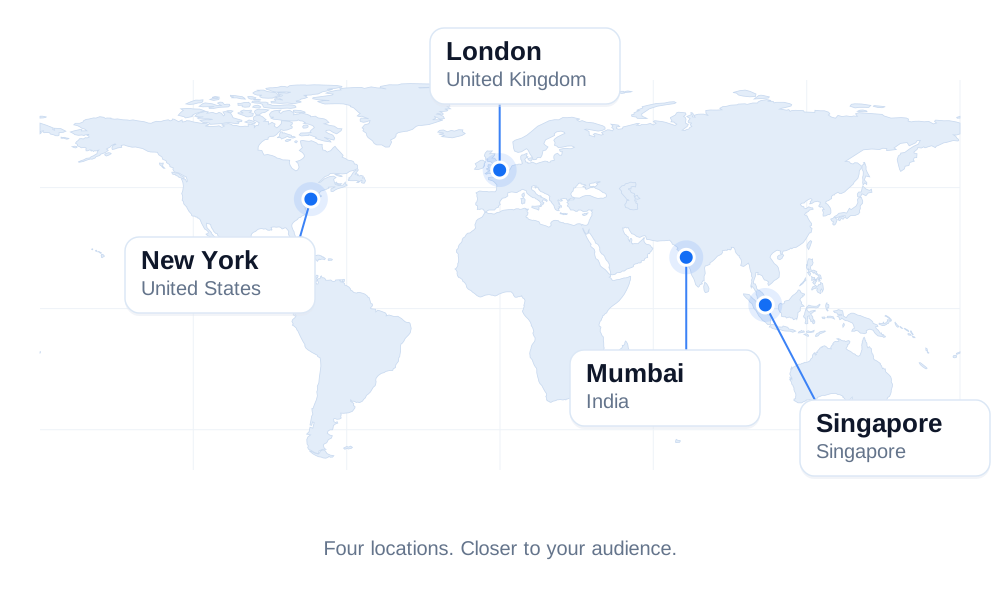
Deploy your websites and applications closer to your audience with strategically located data centers in New York (USA), London (UK), Singapore, and Mumbai (India). Built to deliver reliable connectivity and low latency.
Contact Our Team
Your next step starts with a conversation. From choosing a hosting plan to moving your website or planning a custom setup, we’re here to help.

What Our Customers Say
"I moved two business websites from shared hosting to a VPS, and the difference was obvious within the first few days. Page loading times became more consistent, and the migration process was much smoother than I expected."
Rahul Sharma
Pune, India · VPS"I've been using the shared hosting plan for my portfolio website for more than a year. The setup process was simple, and whenever I needed help, the support team responded quickly."
Emily Carter
Manchester, UK · Shared"Managing our WordPress store became much easier after switching to managed hosting. Updates, backups, and security tasks are handled for us, which gives us more time to focus on the business."
Jason Miller
Austin, USA · WP Hosting"Our applications required a dedicated environment with more resources and complete control over the server. Everything was configured exactly as requested, and the transition was completed without any major issues."
Lucas Schneider
Berlin, Germany · DedicatedHow to Choose the Right Shared Hosting Plan
The cheapest shared hosting plan is not always the right one. Your choice should match the number of websites you want to run, the storage you need, your expected traffic, and the features you will actually use. A little planning now can save you from upgrading sooner than expected.
How many websites do you need to host?
Start by counting the websites you plan to run under the same hosting account. If you are launching a single business website or blog, a basic single-website plan may be sufficient. If you manage multiple websites, look for a plan that allows the number of domains or websites you need.
How much storage does your website need?
Consider your website files, images, videos, databases, emails, and future content. A simple company website may need relatively little storage, while an e-commerce store, photography website, or media-heavy site can use considerably more. Choose enough space for your current website without paying for capacity you are unlikely to use.
Do you need business email?
If you want professional email addresses using your own domain, check whether the hosting plan includes email accounts and how much mailbox storage is provided. For a business website, having an address such as [email protected] can be more practical than relying on a personal email service.
Do you need higher performance resources?
Think about your website's expected traffic and workload. A small blog with modest traffic has different requirements from an ecommerce store receiving regular orders. If you expect more visitors, database activity, or resource-heavy plugins and applications, compare the CPU, RAM, storage, and other resource limits of each plan.
Will your website grow quickly?
Don't choose a plan based only on what you need today. If you are launching a new business, online store, popular blog, or content website, your traffic and storage requirements may increase over time. Check whether your provider makes it easy to upgrade to a larger shared hosting plan or move to VPS hosting when your website outgrows the current setup.
Do you need advanced backup and security features?
Look beyond the words "secure hosting" and check exactly what is included. Useful features can include SSL certificates, malware protection, firewall protection, DDoS protection, server monitoring, and regular backups. Also check backup frequency, retention, and whether you can restore your website when something goes wrong.
Quick Tip: Choose a plan based on your website's actual workload, not simply the lowest price or the largest storage number. The right shared hosting plan should give you enough resources for your current needs while leaving a sensible path for growth.